Monday, November 07, 2011

Disable Session Reliability in XenApp 6

Disable Session Reliability in XenApp 6

Disable Session Reliability in XenApp 6. One of the requirements of published apps in Citrix is to limit the user to a single instance of a published application. In Xenapp 6, the checkbox in the published application properties that states limit the user to one session does not seem to do the trick by itself and often brings about errors. Users receive errors like "the server has reached the maximum number of connections" and others of similar effect.

So what everyone does is uncheck the box and find what is different about Xenapp 6 or even worse think there is a larger problem with their Xenapp 6 installation. The solution is simple enough. Limiting session for a user to one per app can be accomplished using a policy. Create a new computer policy for the farm and disable session reliability. Once session reliability is turned off, check the box in application properties to permit only one instance of the published app .

Thursday, December 16, 2010

The time provider NtpClient is configured to acquire time

If your geting the following error in your system log do the following.
On your root level PDC emulator domain controller run the command at a command prompt:
net time /setsntp:ntp2.usno.navy.mil /set /y
Then restart the time service.
On all child domain controllers that are the PDC emulator for the domain run the following command:
net time \\ROOT-DC-name /set
Change ROOT-DC-name to your root level domain controller name running the PDC emulator.
Then restart the time service.
Check your system log. You will see confirmations that the local time service is now syncing with the time source.

Wednesday, October 06, 2010

BlackBerry Torch Doesn't Reconcile Inbox - Syncing


BlackBerry Torch Syncing Problem with BES 4.1, Exchange 2007.
This was a new BlackBerry Torch 9800 series phone. The user had problems with reconciliation from the begining although it was not noticed right away.

His outlook inbox surely did not match the phones renerding of the inbox. Messages that had been removed in Outlook were still showing on the the BlackBerry Torch 9800 phone. Not part of the problem, but this user had ATT service. The BES (BlackBerry Enterprise Server) was version 4.1. There were about another 70 users on the BES server but none of them had this issue. What was done to resolve was firstly to change the number of messages tracked on the BES server and enabled HARD delete tracking.
Those options can be found by logging into the BES 4.1 server:
- Open BlackBerry Manager.
- In the explorer view, click server.
- On the server configuration tab, click edit Properties, then click Messaging.
- For the hard deletes reconciliation option, select True from the drop-down menu
- Restart the BlackBerry enterprise Server services ( I recommend restarting the services from the services control panel applet, not from the BES manager).
To change the number of messages tracked (the default messages tracked is 100)
In the performance section change the value of the Message State database Size to 1000. 1000 is the max.
I also resent the service book for the user, resent the IT policy, resent the peer to peer key.

Thursday, December 31, 2009

Supporting Technology with Technology.: Enable 24 bit color in RDP for XP or 2003 Server


Supporting Technology with Technology.: Enable 24 bit color in RDP for XP or 2003 Server

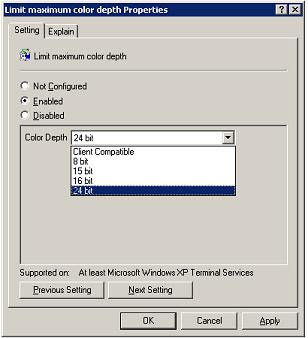
Connect with true color 24 bit rdp to XP or windows 2003 server. A pre-defined default color limit on XP or windows 2003 server limits the color depth of RDP connections made to the the systems to a 16 bit maximum. How to configure the "server side" of remote desktop to accept connections at 24-bit true color. Windows 7, Vista, and Server 2008 already allow higher that 24 bit color by default.