Thursday, December 16, 2010


Wednesday, October 06, 2010
BlackBerry Torch Doesn't Reconcile Inbox - Syncing

BlackBerry Torch Syncing Problem with BES 4.1, Exchange 2007.
This was a new BlackBerry Torch 9800 series phone. The user had problems with reconciliation from the begining although it was not noticed right away.
His outlook inbox surely did not match the phones renerding of the inbox. Messages that had been removed in Outlook were still showing on the the BlackBerry Torch 9800 phone. Not part of the problem, but this user had ATT service. The BES (BlackBerry Enterprise Server) was version 4.1. There were about another 70 users on the BES server but none of them had this issue. What was done to resolve was firstly to change the number of messages tracked on the BES server and enabled HARD delete tracking.
Those options can be found by logging into the BES 4.1 server:
- Open BlackBerry Manager.
- In the explorer view, click server.
- On the server configuration tab, click edit Properties, then click Messaging.
- For the hard deletes reconciliation option, select True from the drop-down menu
- Restart the BlackBerry enterprise Server services ( I recommend restarting the services from the services control panel applet, not from the BES manager).
This was a new BlackBerry Torch 9800 series phone. The user had problems with reconciliation from the begining although it was not noticed right away.
His outlook inbox surely did not match the phones renerding of the inbox. Messages that had been removed in Outlook were still showing on the the BlackBerry Torch 9800 phone. Not part of the problem, but this user had ATT service. The BES (BlackBerry Enterprise Server) was version 4.1. There were about another 70 users on the BES server but none of them had this issue. What was done to resolve was firstly to change the number of messages tracked on the BES server and enabled HARD delete tracking.
Those options can be found by logging into the BES 4.1 server:
- Open BlackBerry Manager.
- In the explorer view, click server.
- On the server configuration tab, click edit Properties, then click Messaging.
- For the hard deletes reconciliation option, select True from the drop-down menu
- Restart the BlackBerry enterprise Server services ( I recommend restarting the services from the services control panel applet, not from the BES manager).
To change the number of messages tracked (the default messages tracked is 100)
In the performance section change the value of the Message State database Size to 1000. 1000 is the max.
I also resent the service book for the user, resent the IT policy, resent the peer to peer key.
Thursday, December 31, 2009
Supporting Technology with Technology.: Enable 24 bit color in RDP for XP or 2003 Server

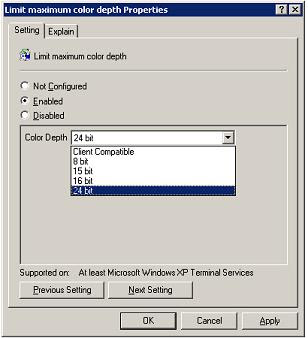
Supporting Technology with Technology.: Enable 24 bit color in RDP for XP or 2003 Server
Connect with true color 24 bit rdp to XP or windows 2003 server. A pre-defined default color limit on XP or windows 2003 server limits the color depth of RDP connections made to the the systems to a 16 bit maximum. How to configure the "server side" of remote desktop to accept connections at 24-bit true color. Windows 7, Vista, and Server 2008 already allow higher that 24 bit color by default.
Connect with true color 24 bit rdp to XP or windows 2003 server. A pre-defined default color limit on XP or windows 2003 server limits the color depth of RDP connections made to the the systems to a 16 bit maximum. How to configure the "server side" of remote desktop to accept connections at 24-bit true color. Windows 7, Vista, and Server 2008 already allow higher that 24 bit color by default.
Tuesday, November 24, 2009
What happened to dsa.msc in windows 2008 server

The simple truth is that it's no longer part of the default installation of the server OS, sorry. There's a logical explanation of this for sure. The first that comes to mind is security. Anyone with access to a server can load up users and computers on any member server. This is usually no big deal but with identity theft always on the rise, this is a convenient way to get additional information about users.
With windows 2003 a member server made a nice convenient gateway to AD users and computers by simply executing dsa.msc from the command line or from the start run command. while working out issues on another server, a handy look-up and some times a useful tool to add a test account or to make a quick change to an existing account , was running dsa.msc. Although in environments that had Exchange servers, running this from a member server would not shoe email properties, it was still useful and often meant having to avoid another remote connection to a domain controller.
The image in this post shows the options that should be selected to add this functionality back into member server. The installation of the feature does not require a reboot and only takes several minutes - of course that's on a dual quad core server.
A positive about server support , in particular when the server is an HP or Dell PowerEdge server, is the technology developed and incorporated into server support that facilitates remote access and remote control of servers from the local LAN or through the Internet. The technology that permits this remote control of the console is HP iLO and from Dell it is Dell iDRAC. These two technologies have enabled support to remote control the server's console without having to even have an operating system installed. The technology permits support through the network and on the web.
Subscribe to:
Posts (Atom)